Understanding graphic design means learning the technical details behind your designs. Whether you are preparing your logo for exquisite embroidery or creating web icons, choosing the proper file type is critical. This blog will assist you in making sense of AI, EPS, and SVG files to optimize your working process. Our vector art services can help ensure your files are perfectly prepared for any project.
Why Vector File Format Choice Matters for Your Design
Selecting the incorrect file format is one of the mistakes that can lead to additional costs and increased production time. They won’t even be able to use it, and the picture will look unclear after printing when you provide an unclear image file to your professional print company.
- Scalability: Vector files, unlike Raster Graphics (JPG, PNG), don’t have any loss in quality while resizing.
- Production Standards: For embroidery and screen printing equipment, it is necessary to have clear paths, which only professional vector artwork services can provide.
- Workflow Efficiency: Picking the correct file format allows your team or your professional printer to work with the file without encountering any technical problems.
- Professionalism: The better quality of your vector file is the better image you’ll present as a professional. Utilizing top-tier vector graphics services elevates your brand identity.
Quick Comparison: AI vs EPS vs SVG at a Glance
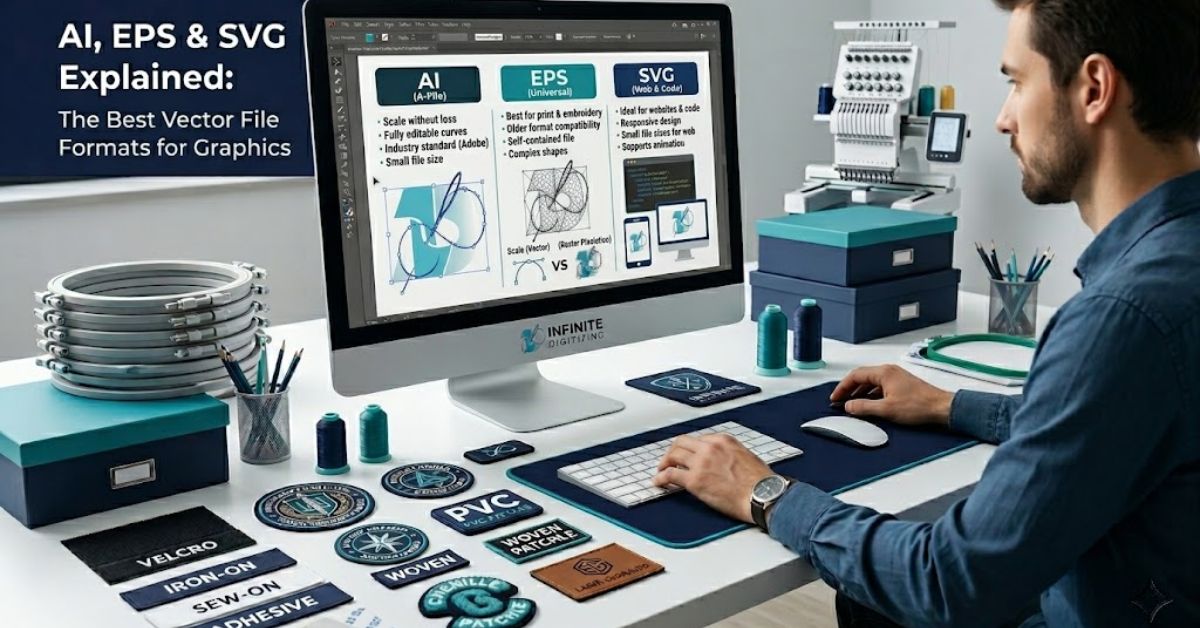
By hiring our vector graphics services, you will be sure to get your designs in the optimal format for your particular use case. Below is a comparison of these industry-standard formats:
| Feature | AI (Adobe Illustrator) | EPS File Format | SVG File Format |
|---|---|---|---|
| Best For | Professional Editing | Print & Embroidery | Web & Digital Use |
| Editable | Yes (Native) | Yes | Yes (Code/Design) |
| Software | Adobe Illustrator | AI, CorelDRAW | Browsers, Illustrator |
| Print Ready | Yes | Yes (Standard) | Limited |
| Web Use | No | No | Yes (Native) |
| Infinite Digitizing Compatible | ✓ Yes | ✓ Yes | ✓ Yes |
AI File Format: Best for Professional Design Workflows
Adobe Illustrator uses the following file format: the AI File Format. It is common for designers to use this type of file format when designing their brands’ logos and graphics. If you need a reliable vector art conversion service, look no further.
- Full Editability: They can easily be edited anytime in the future due to the reason that all layers, paths, and other effects can be retained.
- Source Integrity: This is the “original” document. If you plan to make future updates to your logo, always keep the AI file, a standard practice for our vector artwork services.
- Professional Standard: It is the preferred format for any ongoing project where a designer will need to access the raw components of your design through professional vector artwork services.
EPS File Format: Best for Print & Universal Compatibility
The EPS File Format (Encapsulated PostScript) is the most trusted in the print and embroidery industries. Its wide compatibility makes it the “go-to” for production houses worldwide. Utilizing a quality vectorization service ensures these files maintain their integrity.
- Universal Use: It works seamlessly in CorelDRAW, Adobe Illustrator, and practically every other RIP software program.
- Print Reliability: EPS files are designed to retain their colors and sharp lines because that’s necessary when creating screen prints and embroideries.
- Versatility: No matter whether you’re looking for a vinyl sign, a printed T-shirt, or an embroidered design, the EPS file format is the preferred one by print shops, frequently refined by a high-quality vectorization service.
SVG File Format: Best for Web & Digital Graphics
SVG File Format (Scalable Vector Graphics) is the present-day format used on the Internet. Instead of outdated raster graphics, SVG allows the use of code for drawing lines and figures, thus making sure that your website works effectively. By employing our vector art conversion service, you ensure web-ready assets.
- Web Performance: As SVG files are lightweight and scalable, they work great for icons on mobiles and monitors with high-definition resolution.
- Responsive Design: Being code-based, SVG files can be simply worked with by developers and used for animation and other interactive functions.
- Browser Support: SVG is supported natively in all current browsers, which makes it best for use with logos, buttons, and UI designs, often requiring a professional vectorization service to create.
Raster vs Vector: Why Format Matters for Embroidery & Print
Many clients try to send their embroidery artwork in JPG or PNG format, but fail because those formats do not contain enough path data for the production equipment to understand. Our vector graphics services solve this.
- The Problem: Raster images become blurry if enlarged, making them unreadable by the digitizing equipment.
- The Solution: A professional vectorization service traces your raster image, rebuilding it into a clean, smooth vector path.
- Our Quality Guarantee: Infinite Digitizing manually redraws your logo in Adobe Illustrator. We avoid automated “auto-trace” tools that create messy, unusable artwork, unlike a low-quality vector art conversion service.
How Infinite Digitizing’s Vector Art Conversion Service Handles All Formats
We are a USA-based provider of professional vector artwork services dedicated to helping you get the right file every time. We make our conversion process easy and cost-effective.
- Comprehensive Service: Our company supports all types of JPG, PNG, PDF, AI, and EPS formats and converts them according to the specifications of your production facility using our specialized vector graphics services.
- Pricing: Starting costs for a simple design are $7, for a medium design, $10, and for a complicated design, $25.
- Fast Delivery: Our standard delivery time is from 4 to 6 hours, but there are additional 2-hour deliveries.
- Support: We assure 24/7 availability along with unlimited revisions. As a top vector art conversion service, we prioritize your satisfaction.
Conclusion
Understanding the differences between AI, EPS, and SVG files provides you with the ability to converse with your printing company and developers successfully. Your brand logo will be clear, scalable, and look professional in the end when selecting the appropriate file type for your task.
Choose Infinite Digitizing for precision-crafted, manually redrawn vector files perfect for all your production needs.
Request Your Free Vector Artwork Quote Today!
FAQs
1. What is a vector file in graphic design?
A: It is an image file made of mathematical paths, allowing for infinite, high-quality scaling.
2. What is the difference between AI, EPS, and SVG files?
A: AI is for editing, EPS is for universal printing, and SVG is for web performance.
3. Why are vector files important for printing?
A: They provide the clean, precise path data required by embroidery and screen printing machines.
4. Can raster images be converted into vector files?
A: Yes, professional designers can manually redraw them into high-quality vector paths.
5. Which software is used for vector graphics?
A: Adobe Illustrator is the industry standard for creating and editing professional vector files.